
Choose a side cart template
Templates give your side cart a complete look in one click: colors, fonts, layout and which sections show. Open them from OCart → Side cart → Templates, or Change template on the dashboard.
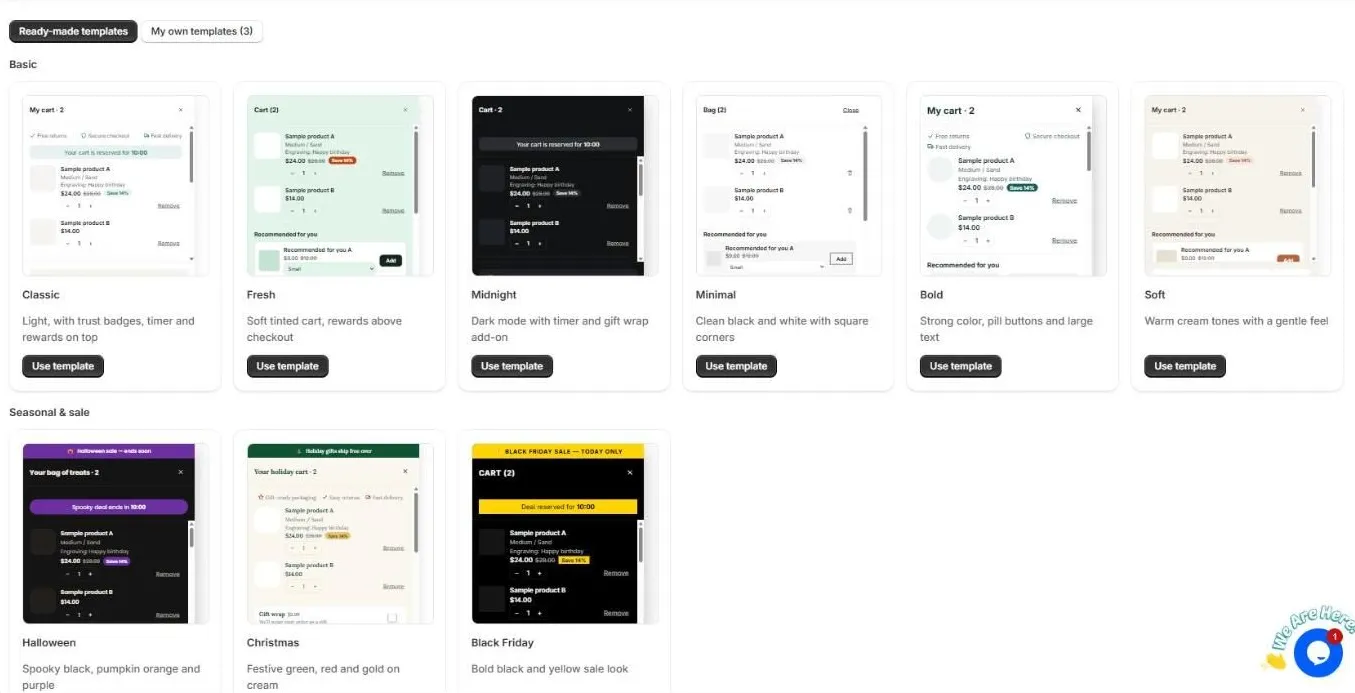
Ready-made templates
Basic
- Classic. Light, with trust badges, a timer and rewards on top.
- Fresh. A soft tinted cart, with rewards above checkout.
- Midnight. Dark mode, with a timer and a gift wrap add-on.
- Minimal. Clean black and white, with square corners.
- Bold. Strong color, pill buttons and large text.
- Soft. Warm cream tones with a gentle feel.
Seasonal & sale
- Halloween, Christmas and Black Friday. Ready for your sales campaigns.
Click Use template to apply one. Your products, rewards and upsell choices are kept. Only the look and layout change. You can choose whether to also use the template’s texts.
Save your own template
Designed a cart you love? In the side cart editor, open Design and click Save as my template. Your saved designs appear under My own templates, where you can rename them or apply them again later. This is handy for switching between a normal cart and a sale cart.
Tips
- Switch to a seasonal template a few days before a sale, then switch back afterwards.
- After applying a template, check the preview on mobile. Most shoppers will see it there.
Still need help?
Chat with us from OCart → Help, or send us a message. We usually reply within one business day.
Contact support
Install OCart · coming soon