
Track results in OCart Analytics
OCart → Analytics shows how much extra revenue your offers bring in. Use the filters at the top to pick a placement (side cart or product page) and a date range.
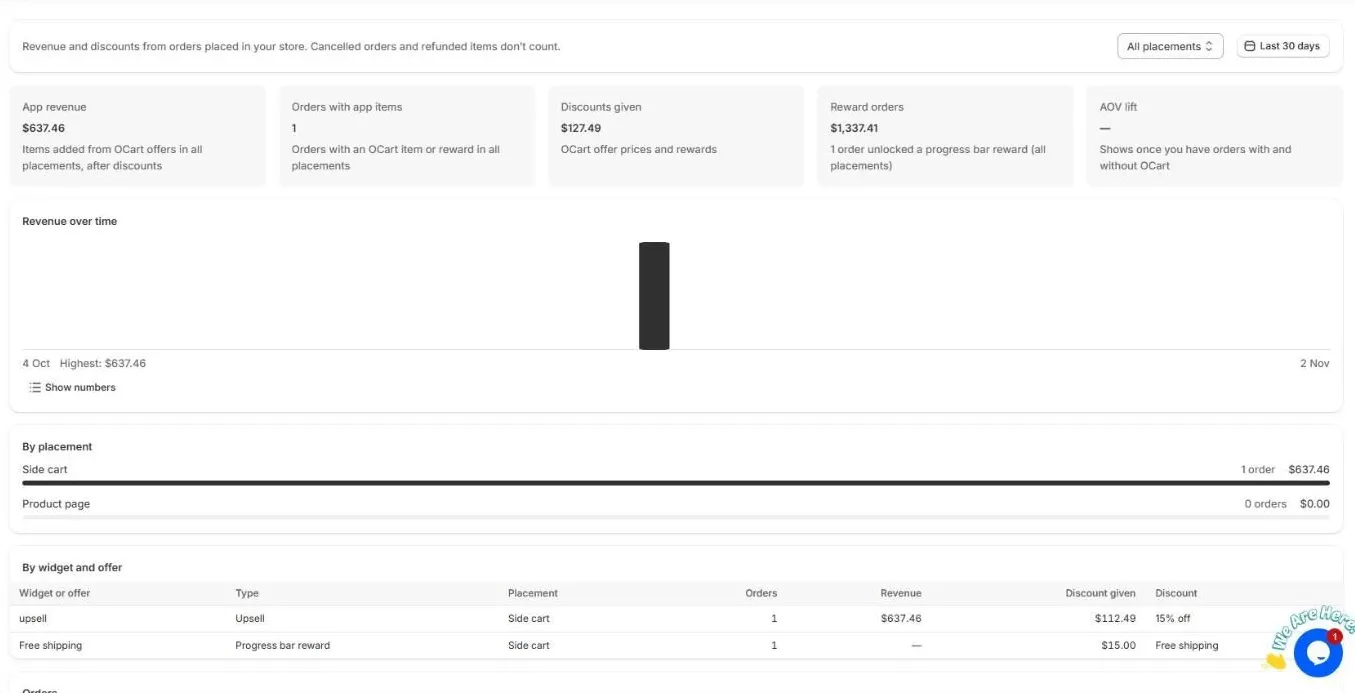
The numbers
| Metric | What it means |
|---|---|
| App revenue | Revenue from items shoppers added through OCart offers, after discounts |
| Orders with app items | Orders that include an OCart item or reward |
| Discounts given | The total of OCart offer prices and rewards |
| Reward orders | The total of orders that unlocked a progress bar reward |
| AOV lift | How much bigger orders with OCart are than orders without it |
Cancelled orders and refunded items don’t count, so the numbers stay accurate after returns.
Breakdowns
- Revenue over time. A daily chart. Click Show numbers to see it as a table.
- By placement. Side cart compared with product page.
- By widget and offer. Orders, revenue, discount given and the discount for each upsell, reward, bundle and add-on. Use it to find your best offers.
- Orders. The orders that included OCart items.
Good to know
- When you install OCart, it imports your last 60 days of orders, so you see results straight away.
- New orders show within a few minutes.
- The dashboard shows the same totals for the last 30 days.
Frequently asked questions
How is app revenue counted?
From orders that include an item added through an OCart offer, after discounts. Cancelled orders and refunded items are left out.
Why is AOV lift empty?
AOV lift compares orders with and without OCart. It shows once your store has both kinds of orders in the selected date range.
Still need help?
Chat with us from OCart → Help, or send us a message. We usually reply within one business day.
Contact support
Install OCart · coming soon