
Show offers on product pages
Product page offers appear inside OCart blocks that you add to your product page template. Open OCart → Product page to see their status.
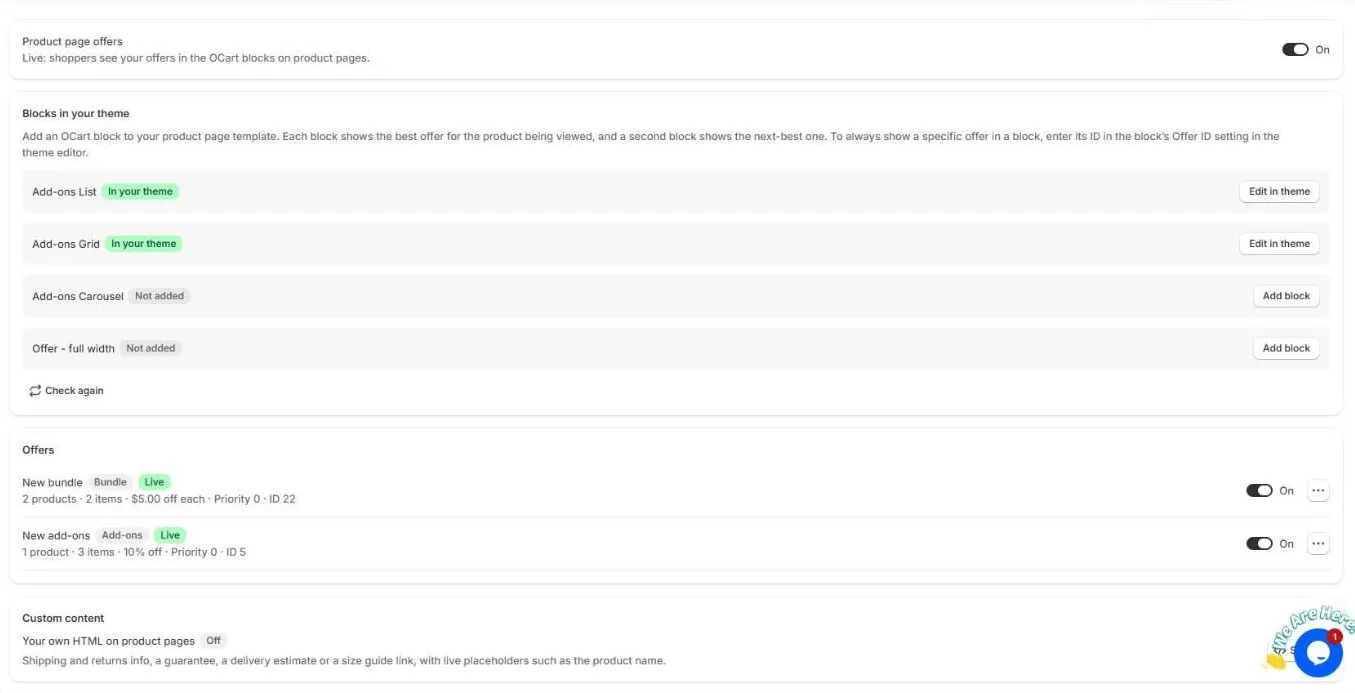
1. Turn on product page offers
Make sure the Product page offers switch at the top is On. When it is off, no offers show on your store, but your offers are kept.
2. Add a block to your theme
Under Blocks in your theme, OCart lists the available blocks and whether each one is already in your theme:
| Block | Best for |
|---|---|
| Add-ons List | Add-ons as rows under Add to cart |
| Add-ons Grid | Add-ons as cards side by side |
| Add-ons Carousel | Many add-ons in a slider |
| Offer – full width | Bundles across the full page width |
Click Add block. The theme editor opens on your product template with the block ready to add. Place it near the Buy buttons, then click Save. Back in OCart, click Check again to update the status.
Each block shows the best offer for the product being viewed. Add a second block to show the next-best offer.
3. Create offers
- Create a bundle: products bought together at a special price.
- Create add-ons: optional extras shoppers can tick.
The Offers list shows each offer’s type, status (Live, Scheduled, Ended), discount, priority and ID. Use the switch to turn an offer on or off, or the ⋯ menu to duplicate or delete it. A duplicate starts turned off.
Custom content
Custom content lets you show your own HTML on product pages, such as shipping and returns info, a guarantee, a delivery estimate or a size guide link. You can use live placeholders, such as the product name. HTML is cleaned for safety when you save.
Frequently asked questions
Which offer shows when several match a product?
The one with the highest priority (0 to 1000). If priorities are equal, the newest offer shows. A second OCart block shows the next-best offer.
Can I always show one specific offer in a block?
Yes. Copy the offer’s ID from the Offers list and enter it in the block’s Offer ID setting in the theme editor.
Still need help?
Chat with us from OCart → Help, or send us a message. We usually reply within one business day.