
Add progress bar rewards to the cart
A progress bar shows shoppers how close they are to a reward, for example “Spend $20 more for free shipping”. It is one of the most effective ways to raise average order value.
Set up rewards
- Open OCart → Side cart and select Progress bar & rewards in the section list. If it isn’t there, click Add widget → Progress bar & rewards.
- Turn the widget to Shown.
- Under Reward tiers, add up to 3 rewards. For each one choose:
- Reward type: Free shipping, Percentage off, Fixed amount off, or Free gift.
- Unlocks at: the cart total that unlocks it, in your store currency.
- Amount off, or the gift product.
- Reward name: shown on the bar and at checkout. Use
{amount}to show the amount in each shopper’s currency.
- Click Save.
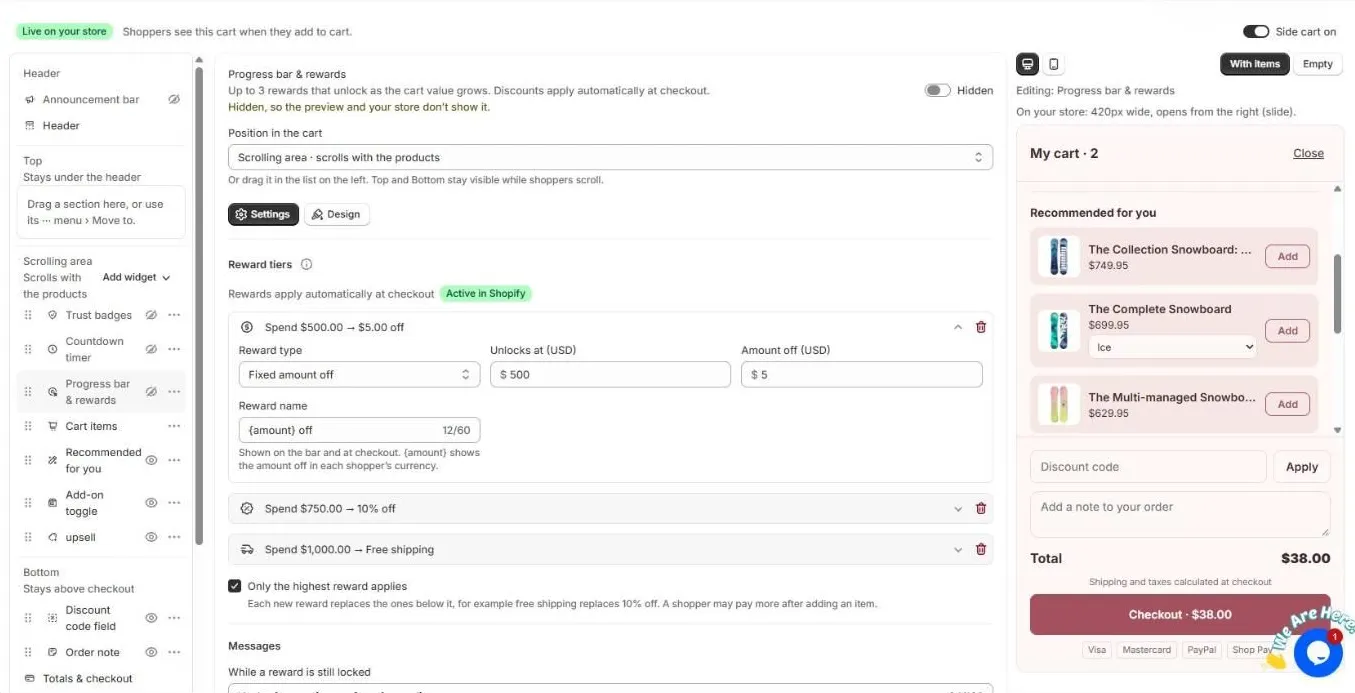
The Active in Shopify badge confirms the rewards discount is live.
Options
- Only the highest reward applies. Each new reward replaces the ones below it. For example, free shipping replaces 10% off.
- Messages. Change the text shown while a reward is still locked and after it unlocks.
- Design. Bar height, colors, reward markers, and Show confetti when the last reward is unlocked.
- Hide the bar when every reward is unlocked.
- Position. Put the bar in the Top area so it stays visible while shoppers scroll.
Free shipping
If you already have a free-shipping rate in Shopify → Settings → Shipping at the same amount, you don’t need OCart to create one. OCart still shows the progress towards it.
Related
Frequently asked questions
How are rewards applied at checkout?
Every OCart reward is applied by one automatic Shopify discount called “OCart offers”. Shoppers don’t need a code. Keep that discount active in Shopify → Discounts.
Can a shopper get several rewards at once?
Yes, unless you tick “Only the highest reward applies”. With it ticked, each new reward replaces the ones below it.
Still need help?
Chat with us from OCart → Help, or send us a message. We usually reply within one business day.