
Add optional add-ons to product pages
Add-ons are optional extras shown next to Add to cart. Shoppers tick the ones they want, and these are added together with the main product. Each add-on can have its own discounted price.
Go to OCart → Product page → Create add-ons.
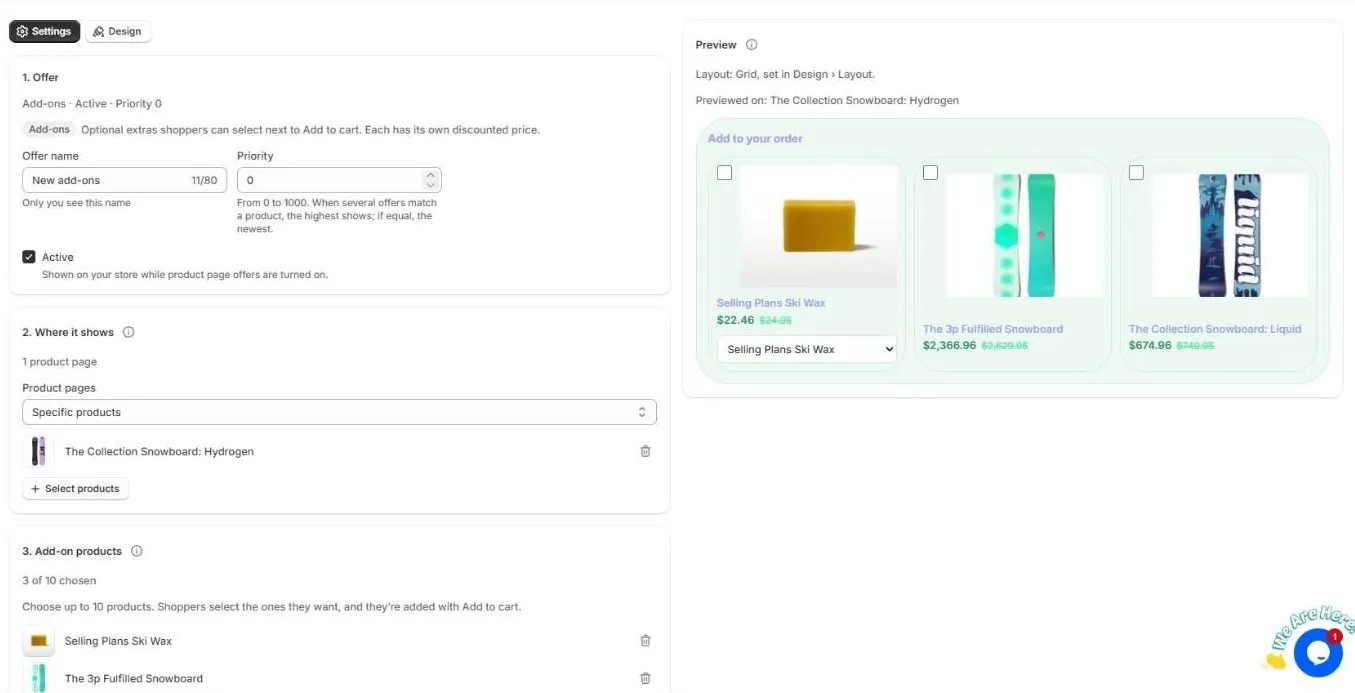
Set up add-ons
- Offer. Give it a name and priority, and keep Active ticked.
- Where it shows. Choose all products, specific products or products in collections.
- Add-on products. Choose up to 10 products. Shoppers can choose a variant for products that have more than one.
- Discount. Percentage off or a fixed amount off each add-on. It is applied automatically at checkout.
- Texts. Heading (for example “Add to your order”), labels and savings text.
- Schedule. Optional start and end dates.
Use the Design tab to choose List, Grid or Carousel. The layout should match the OCart block you added to your theme: Add-ons List, Add-ons Grid or Add-ons Carousel.
Good add-on ideas
- Accessories: cases, straps, cables
- Care and maintenance: wax, cleaning kits, refills
- Services: gift wrap, extended warranty
- Small items under 20% of the main product’s price
Related
Still need help?
Chat with us from OCart → Help, or send us a message. We usually reply within one business day.
Contact support
Install OCart · coming soon